
LoyalKit Cards guide
How Apple and Google Wallet alerts work near your shop
Understand the difference between Apple's Lock Screen pass suggestion and Google's nearby notification, including permissions, limits, reliability, and measurement.
A saved loyalty pass can become easier to reach when a customer approaches a participating shop. Apple Wallet can suggest a relevant pass on the Lock Screen, while Google Wallet can send a Nearby Passes notification. Each platform handles the experience according to the customer's settings and its own delivery rules.
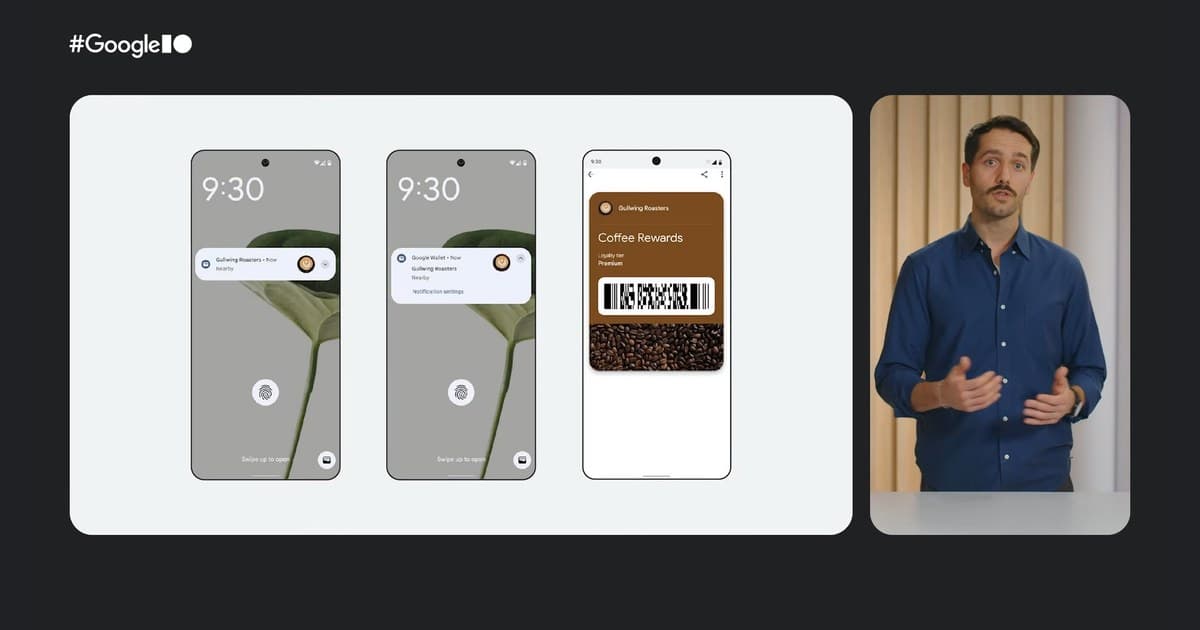
The demonstration comes from a Google Wallet Nearby Passes report covering the Google I/O 2025 Wallet session. It demonstrates the journey from a nearby notification to the saved coffee rewards pass.
What happens when a customer approaches the shop
The shop supplies its branch coordinates as part of the Wallet pass data. The customer must already have the loyalty pass saved. The phone's Wallet platform then evaluates the configured locations, device state, customer settings, and other platform-controlled signals.
On Apple devices, a relevant pass may appear as a suggestion on the Lock Screen. Tapping it opens the pass so the customer can present its QR code. Apple describes this as pass relevance based on locations or beacons in its Lock Screen documentation.
On supported Android devices, Google Wallet can display a nearby notification. Google says the notification is sticky while the user remains at the specified location, can be dismissed, and disappears after the user leaves. Tapping it opens the saved pass. Google made Nearby Passes Geofence Notifications available to regular pass types on October 14, 2025, according to the Google Wallet release notes.
| Behavior | Apple Wallet | Google Wallet |
|---|---|---|
| Customer experience | A relevant-pass suggestion may appear on the Lock Screen | A Nearby Passes push notification may appear on the Lock Screen |
| Location data | Pass locations | Merchant locations on the pass class or object |
| Published platform limit | Up to 10 relevant locations in a pass | Up to 10 locations per class and 10 per object |
| Radius and timing | Apple evaluates relevance for the saved shop location | Google evaluates proximity, dwell time, and delivery timing |
| Alert wording | The pass can include relevant text, while Apple controls presentation | Google controls the nearby notification text |
Permissions and settings determine eligibility
Google's Nearby Notifications documentation says a user needs Google Wallet notifications enabled and must grant the app precise, always-on location access. If either permission is unavailable or disabled, the nearby notification should not be expected.
Apple's behavior also depends on the device being able to evaluate pass relevance and on the customer not disabling the relevant Wallet suggestion. The pass still remains available inside Wallet when a Lock Screen suggestion does not appear.
How the alert radius and message are handled
The Wallet platforms handle the delivery details automatically. Google states that it determines how close a user should be, how long the user should remain nearby, and the text shown in the notification.
Apple uses its pass-relevance system to decide when the saved pass is useful near the supplied location. Its pass format also supports a maximum-distance value that can reduce the system's default relevance range.
With LoyalKit, the merchant can save up to 10 named branch locations in the dashboard or staff app. LoyalKit includes the precise coordinates in the Apple and Google Wallet data, while each platform manages the customer-facing relevance experience. Apple's Wallet pass reference documents the underlying pass behavior.
How a LoyalKit shop configures its location
The shop owner adds and pins each branch under Shop Details & Branding. The first branch is the primary location, and up to nine additional branches can be added. LoyalKit saves each latitude and longitude, includes the coordinates in newly generated Apple and Google Wallet data, and schedules existing Wallet passes for refresh after the shop details change.
After the branch list is saved, LoyalKit starts the Wallet refresh process. Testing with real supported devices confirms the customer experience at the shop's configured locations and device settings.
Location alert setup checklist
- Pin the customer entrance or the most representative point for each branch.
- Save the shop settings and confirm the map still shows the intended point.
- Add a test loyalty pass to a compatible iPhone and a supported Android phone.
- Enable the required Wallet notifications and location settings on the test devices.
- Approach the shop naturally and allow time for each Wallet platform to evaluate relevance.
- Let customers know that Wallet notification and location settings enable the nearby experience.
What published results can tell us
Research supports the general idea that timely mobile prompts can reduce the effort required to find an offer. It does not establish a universal conversion rate for Apple or Google Wallet alerts.
A randomized field experiment published in Information Systems Research studied 184,324 consumers who entered 100-meter geofences around 6,040 competing grocery stores. Coupon redemption was 34.8% for push delivery and 32.8% for pull delivery. That is a 2 percentage-point difference, or a 6% relative lift. The experiment ran in winter 2018 through a grocery loyalty app, not through Apple Wallet or Google Wallet, so its results provide context rather than a Wallet benchmark.
The same study reported that approximately 65% of active app users had granted push permission and around 50% had opted into location tracking. Those figures came from that specific provider and period, and they show why a clear explanation of notification and location settings matters.
Google's Wallet partner case studies report that Pets Place reached 60% Wallet adoption and that nearly one-third of members visited a store within three weeks of a targeted push notification. Google also reports that San Francisco Zoo increased member interactions by 400%, with push notifications reaching a 75% open rate. These partner-reported outcomes show the engagement potential of making Wallet passes timely and easy to reach, while individual results vary by program and audience.
| Evidence | Reported result | How to interpret it |
|---|---|---|
| Randomized grocery-app experiment | 34.8% push redemption versus 32.8% pull redemption | Evidence that timely push delivery can reduce search effort in one coupon context |
| Pets Place Google case study | 60% Wallet adoption; nearly one-third visited within three weeks of a targeted push | A partner-reported outcome combining Wallet adoption and targeted messaging |
| San Francisco Zoo Google case study | 75% push open rate; 400% increase in member interactions | An example of the engagement potential of timely Wallet communication |
Measure the business outcomes that matter
LoyalKit helps a shop evaluate the loyalty outcomes it can act on, including active members, repeat visits, recorded loyalty actions, completed rewards, and redemptions.
Record the date the shop location was enabled, compare equivalent weekdays before and after the change, and note other changes such as promotions, weather, holidays, or staffing. A simple before-and-after comparison can reveal a useful pattern, but it cannot prove that location relevance caused the result.
For the full customer and staff journey, read how digital loyalty cards work. The Apple and Google Wallet loyalty card overview explains what remains consistent across platforms, while the digital loyalty card page covers the complete LoyalKit operating model.
How is the alert radius chosen?
Google automatically evaluates proximity and dwell time, while Apple automatically evaluates pass relevance for the saved branch locations. LoyalKit supplies up to 10 precise branch coordinates to both platforms.
What enables a customer to receive the nearby experience?
The customer saves the loyalty pass and enables the required Wallet notification and location settings. The Wallet platform then evaluates when the pass is relevant near the shop.
How do Apple and Google present the location alert?
Both make the saved pass easier to reach. Apple can surface a relevant-pass suggestion on the Lock Screen, while Google Wallet can send a Nearby Passes notification.
Does LoyalKit track a customer's live location?
LoyalKit stores the shop's coordinates, not the customer's live location. Apple or Google privately evaluates device location according to the customer's settings.
Who writes the Google nearby notification?
Google automatically supplies the Nearby Passes notification text. The shop's branding and loyalty information remain visible when the customer opens the pass.